
If your domain uses our nameservers, you manage its DNS records in the control panel. You might need to do this to verify Microsoft 365 or Google, point a subdomain somewhere else, or add records for an email service.
- Log in to the control panel and click your domain in Websites & Domains.
- Open the Hosting & DNS tab and click DNS.
- Click Add Record, or click an existing record to change it.
- Choose the record type, fill in the host and value, and click OK.
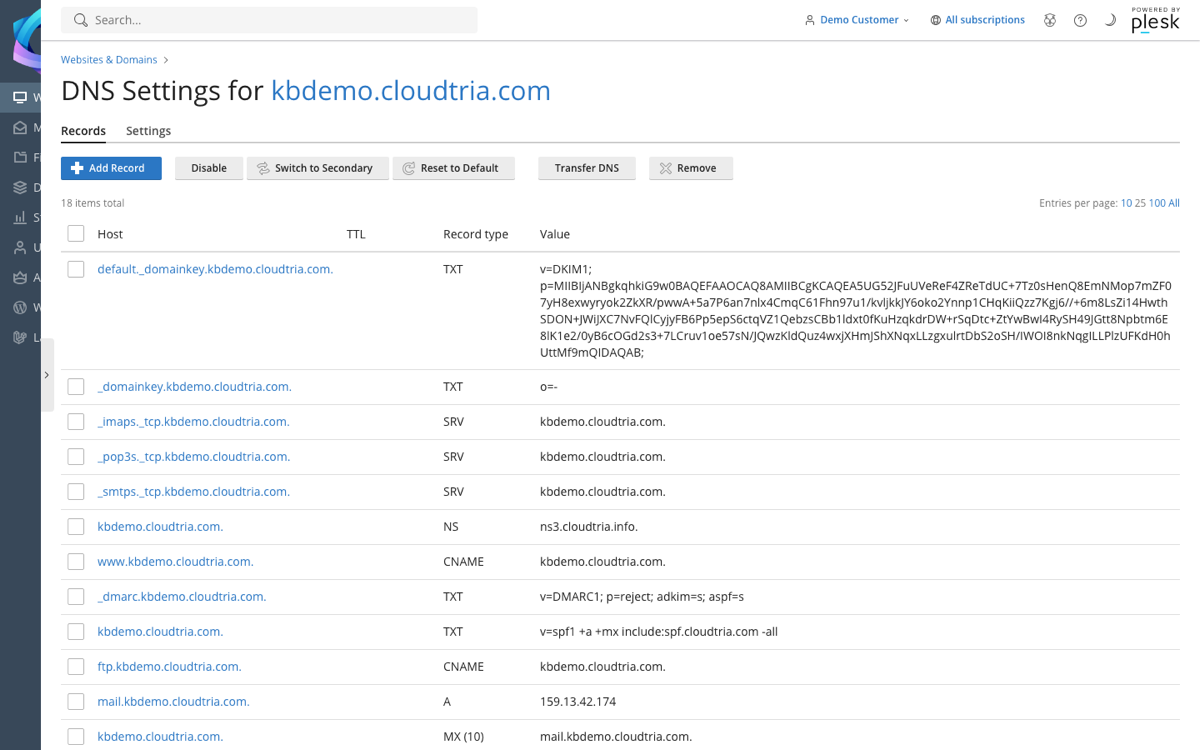
Common record types
| Type | Used for |
|---|---|
| A / AAAA | Points a name to a server's IPv4 / IPv6 address. |
| CNAME | Points a name to another name, e.g. shop to a store provider. |
| MX | Says which server receives email for the domain. |
| TXT | Verification codes, and email security records (SPF, DKIM, DMARC). |
Changing MX, SPF or DKIM records can stop your email working. If you are moving email to another provider, open a ticket and we will check the records with you.
Changes take effect on our nameservers immediately, but others may hold on to the old values for a few hours. See how long DNS changes take.
