
A domain alias makes another domain show your website and receive your email, for example yourbusiness.nz alongside yourbusiness.co.nz. It used to be called a parked domain. Every plan includes up to three.
- Point the extra domain at our nameservers.
- Log in to the control panel and go to Websites & Domains.
- Click Add Domain Alias.
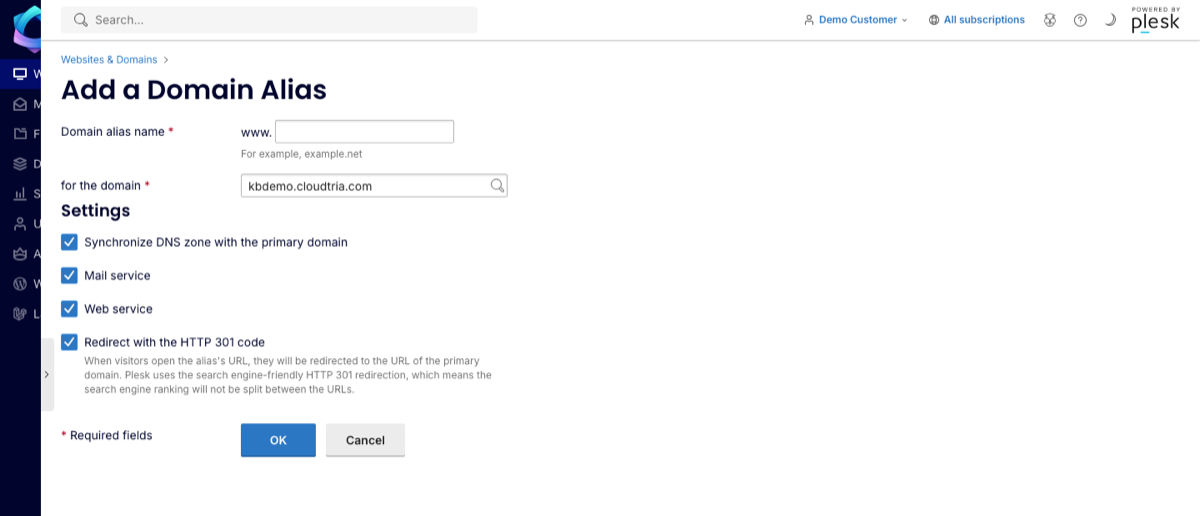
- Enter the extra domain and choose which of your websites it belongs to.
- Choose the settings, then click OK.
| Setting | What it does |
|---|---|
| Synchronize DNS zone with the primary domain | Copies your main domain's DNS records, so the alias works straight away. Leave ticked. |
| Mail service | Email sent to the alias arrives in the same mailboxes, e.g. sales@yourbusiness.nz goes to sales@yourbusiness.co.nz. |
| Web service | The alias opens your website. |
| Redirect with the HTTP 301 code | Visitors are sent on to your main domain, so search engines see one website, not two copies. Recommended. |
Add a free SSL certificate for the alias too, so https:// works on it. Open the alias in Websites & Domains and use SSL/TLS Certificates.
Want the other domain to show a different website instead? Add it as a separate website if your plan has room.
