
An SSL certificate puts the padlock in the address bar and keeps your visitors' information private. Every website on our hosting can have one free, and it renews itself.
- Make sure the domain uses our nameservers and the website loads.
- In the control panel, click your domain, then SSL/TLS Certificates on the Dashboard tab.
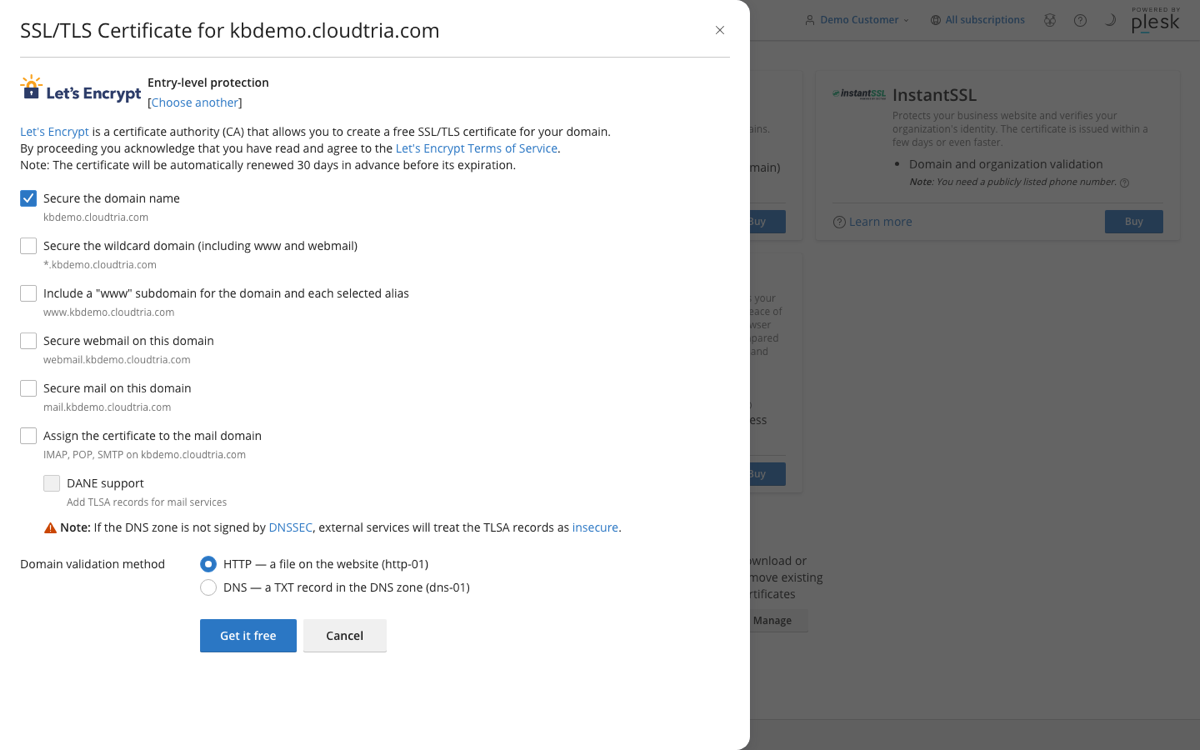
- Scroll down to More options. Next to Install a free basic certificate provided by Let's Encrypt, click Install.

- Tick the names to secure. We recommend all of them:
- Include a "www" subdomain
- Secure webmail on this domain
- Secure mail on this domain and Assign the certificate to the mail domain, so email apps connect securely with your own domain name
- Click Get it free. It takes about a minute.
The certificate renews automatically before it expires.
Send everyone to https
So nobody lands on the insecure version, add this to the top of httpdocs/.htaccess in the File Manager:
RewriteEngine On
RewriteCond %{HTTPS} off
RewriteRule ^(.*)$ https://%{HTTP_HOST}/$1 [R=301,L]
WordPress sites can do this from WordPress Toolkit instead.
The page also offers paid certificates. You only need one if you want your organisation's identity verified, or a warranty. For most websites the free certificate is all you need.
