
A scheduled task runs something automatically on a timetable, such as a script every 15 minutes or a report every night.
- In the control panel, go to Websites & Domains and click Scheduled Tasks.
- Click Add Task.
- Choose the task type:
- Run a PHP script: pick the script, e.g.
httpdocs/cron.php, and the PHP version. - Fetch a URL: loads a web address, e.g.
https://yourdomain.co.nz/wp-cron.php. - Run a command: runs a command in a secure, restricted shell.
- Run a PHP script: pick the script, e.g.
- Under Run, choose how often: hourly, daily, weekly, monthly, or Cron style for a custom schedule such as
*/15 * * * *(every 15 minutes). - Choose whether to be emailed the output: Errors only is a good choice.
- Click Run Now to test it, then OK to save.
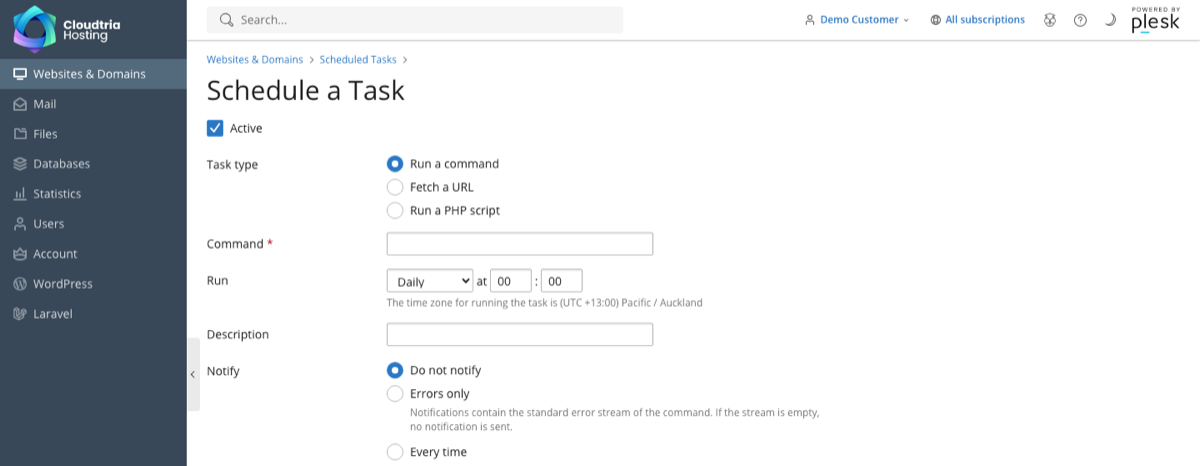
Times are New Zealand time. Use Settings on the Scheduled Tasks page to change the time zone.
WordPress runs its own scheduled jobs when people visit your site. For quiet or very busy sites, add
define('DISABLE_WP_CRON', true); to wp-config.php and fetch https://yourdomain.co.nz/wp-cron.php every 15 minutes instead.Please do not run tasks more often than every 5 minutes. If you need something heavier, talk to us.
