
The control panel at cp.cloudtria.com looks after everything for your website. Here is where to find things.
The menu on the left
| Menu | What it is for |
|---|---|
| Websites & Domains | Your website, subdomains, SSL, PHP, DNS and developer tools. |
| Email addresses, forwarding, auto-replies and spam filtering. | |
| Files | The File Manager for your website files. |
| Databases | MySQL databases and phpMyAdmin. |
| Statistics | Disk space, traffic and visitor reports. |
| Users | Extra control panel logins for staff or developers. |
| Account | Your plan's limits and what it includes. |
| WordPress | Install and look after WordPress sites. |
On a small screen the menu shrinks to icons. Click the arrow at its edge to expand it.
Your domain's dashboard
Click your domain name in Websites & Domains. The Dashboard tab groups the tools you will use most:
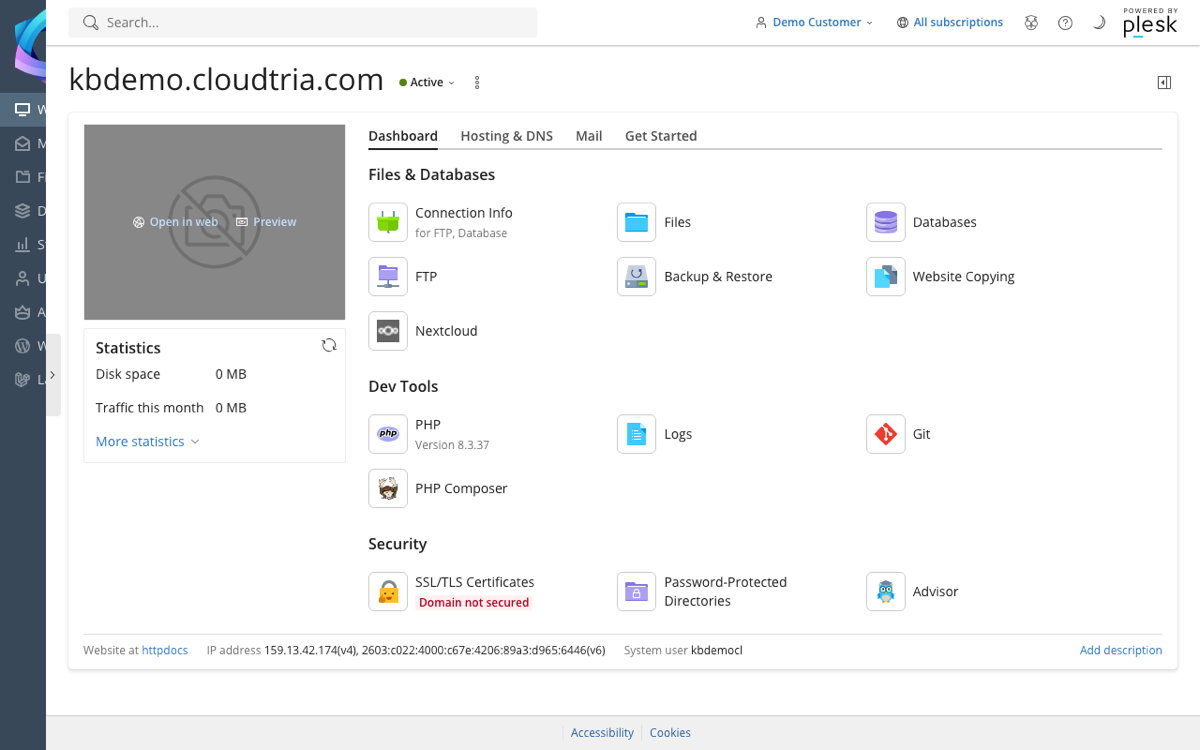
- Files & Databases: Files, Databases, FTP, Backup & Restore and Connection Info (all your FTP and database details in one place).
- Dev Tools: PHP, Logs, Git and PHP Composer.
- Security: SSL/TLS Certificates, Password-Protected Directories and Advisor, which suggests security and speed improvements.
The Get Started tab has one-click starts for WordPress, Cloudtria Builder, Node.js and Git.
Use the search box at the top to jump to any setting by name.
